

What is a UTM Parameter?
Urchin Traffic Monitor (UTM) Parameters are snippets of code that you add to the end of your product or website URL that allow you to track the effectiveness of different campaigns and channels.
UTM Best Practices:
- Use all lowercase letters
- Use underscores and dashes, not spaces
- Do not use UTMs on internal links
- Establish a naming convention and stick to it
- Keep track of all UTMs
Important notes:
- URL Redirects drop UTMs
- Ad blockers can block UTMs
Description of each UTM Parameter
utm_campaign → Specific campaign name for identification (q2_product_launch, holiday_promo)
utm_source → Where the traffic originates (linkedin, google, email)
utm_medium → Marketing channel (cpc, organic_social, email_newsletter)
utm_term (optional) → Keywords for paid search
utm_id (optional) a unique identifier for the specific link used
GA4 introduced 3 additional, optional UTM parameters:
utm_source_platform: the platform from which traffic originates
utm_creative_format: the format of the creative element, like banner, text link, display.
utm_marketing_tactic: specifies the tactic used, such as retargeting or lead generation.





UTMs allow you to A/B test campaigns, measure and allocate resources to high performing channels, conduct cross-platform analysis and much more.
Google’s Campaign URL Builder is a free resource to help you build URLs with UTM parameters.
UTM Essentials
Here are some tips to help you get started establishing your team’s UTM strategy:
Define a Standardized UTM Naming Conventions

Create a Centralized UTM Governance Plan and Document
Develop a shared document or platform, like SharePoint, (or even a UTM tool) to keep track of UTMs used. You can use this document to:
- Define UTM parameters
- List approved values
- Use data-validated dropdown fields in a spreadsheet to enforce naming conventions and avoid ‘free-range’ entries.
- Track past and active campaigns
- Assign UTM dates and owners to URLs
Automate UTM Creation with a URL Builder
Use Google’s UTM Builder, bitly’s tool, create a custom-built UTM generator in Excel using formulas, or a tool or platform like SharePoint to help automated the UTM URL creation. Integrate with Zapier or another marketing automation tool (i.e. HubSpot, Marketo) to automatically append UTMs.
- Build a ‘self-serve’ form (via Excel or SharePoint) for teams to generate UTMs correctly.
Enforce UTM Policy via Governance Rules
To maintain UTM hygiene:
- Require UTM tracking for all external campaigns (ads, email, social, affiliates)
- Restrict freeform UTM entry—enforce dropdowns and pre-approved values
- Regularly review UTMs for inconsistencies
- Create a UTM QA checklist before launching campaigns.
- Assign a POC to check UTMs pre-launch, and/or include UTMs in the campaign QA.
Monitor & Analyze UTM Data
Build reports in Google Analytics 4 (GA4) to track UTM performance. Build onto this foundation with Looker Studio or Power BI reports.
- Validate UTM consistency in GA4 > Traffic Acquisition Report
- Set up custom dashboards in Looker Studio or Power BI
- Monitor campaign effectiveness and correct errors promptly
- Build automated GA4 reports that flag misused UTMs > auto alert user
Educate Teams & Document Processes
Conduct ongoing training sessions for teams:
- Create a UTM playbook with examples, common mistakes, and FAQs
- Offer ‘office hours’ for general help and troubleshooting
- Be available to help, especially in the beginning. Then, slowly encourage team mates to help each other while always serving as the “last line of defense”.
- If available/applicable, establish a Slack or Teams channel for UTM-related questions.
UTM Parameters – Detailed
| Parameter | Required | Example | Description |
|---|---|---|---|
| Campaign ID* utm_id | No | abc.123 | Used to identify which ads campaign this referral references. Use with utm_id to identify a specific ads campaign. |
| Campaign Source utm_source | Yes | Use utm_source to identify the origin of your website traffic – such as a search engine or newsletter name. | |
| Campaign Medium utm_medium | Yes | cpc | Use utm_medium to identify a method of transport for your traffic, such as email or cost-per-click. |
| Campaign Name* utm_campaign | Yes | spring_sale | Use utm_campaign to identify a specific promotion or strategic campaign. |
| Campaign Term utm_term | No | running+shoes | Used for paid search and keyword analysis. Use utm_term to note the keywords for this ad. |
| Campaign Content utm_content | No | logolink | Used for A/B testing, user behavior analysis, and content-targeted ads. Use utm_content to differentiate ads or links that point to the same URL. For example, identify links in an email to determine which links are effective. |
*Do not use both Campaign ID & Campaign Name – use one or the other.
To help remember the difference between source and medium, think of medium as a vehicle that got them to your site, like a car. The Source is what got them on the road and in the car in the first place.
The Basics:
For general promotional links, use the following 3 parameters in each UTM link:
- SOURCE = where the traffic comes from – platform, specific, i.e. google. Facebook, Linkedin
- MEDIUM = the type of traffic – i.e. paid, organic, social, direct
- CAMPAIGN = the name of the promotion you want to track
Finding UTM parameter data in GA4
Now that you have added UTM parameters to the links in your campaigns, you can access this data in Google Analytics, or GA4.

Go to Reports > Acquisition > Traffic Acquisition (or User Acquisition) in the interface. Since the sidebar of GA4 is customizable, your version may not look the same as the screenshot provided, so the report may be in a different location.
Here, you can choose the parameters that you are interested in. Add a primary dimension from the dropdown and a secondary dimension by clicking the plus sign (+).
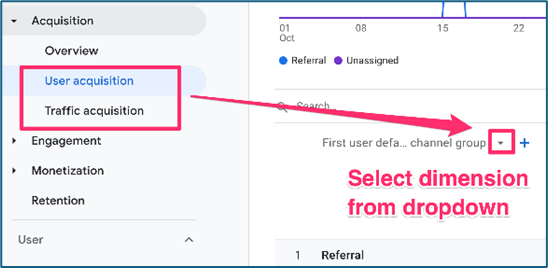

The Session source/medium and Session campaign are a simple place to start since you must include these three parameters in the URL. You can view various metrics associated with these parameters, like users, sessions and total revenue.
Default Channel Dimensions
Channels are rule-based definitions of your website’s traffic sources that let you monitor the performance of all channels sending traffic to your website.
The following are the default dimensions for channel. It’s important to note that with GA4, users and sessions are based on last click, while the default channel group is data-driven and therefore has various weighted touchpoints along the journey.
| Dimension | Definition | Attribution model | Scope |
| Default channel group | The channels by which users arrived at your site/app and triggered a key event. | Attribution model set for the property. Default is data-driven attribution model. | Event |
| Session default channel group | The channels by which users arrived at your site/app when they initiated new sessions | Paid and organic channels last click | Session |
| First user default channel group | The channels by which users first arrived at your site/app | Paid and organic channels last click | User |
You can see the dimensions listed above in the Acquisition reports, the Advertising section of used, and in custom reports.
Default channel descriptions
For reference when working with Google Analytics.
| Channel | Description |
| Affiliates | Affiliates is the channel by which users arrive at your site/app via links on affiliate sites. |
| Audio | Audio is the channel by which users arrive at your site/app via ads on audio platforms (e.g., podcast platforms). |
| Cross-network | Cross-network is the channel by which users arrive at your site/app via ads that appear on a variety of networks (e.g., Search and Display). |
| Direct | Direct is the channel by which users arrive at your site/app via a saved link or by entering your URL. |
| Display | Display is the channel by which users arrive at your site/app via display ads, including ads on the Google Display Network. |
| Email is the channel by which users arrive at your site/app via links in email. | |
| Mobile Push Notifications | Mobile Push Notifications is the channel by which users arrive at your site/app via links in mobile-device messages when they’re not actively using the app. |
| Organic Search | Organic Search is the channel by which users arrive at your site/app via non-ad links in organic-search results. |
| Organic Shopping | Organic Shopping is the channel by which users arrive at your site/app via non-ad links on shopping sites like Amazon or ebay. |
| Organic Social | Organic Social is the channel by which users arrive at your site/app via non-ad links on social sites like Facebook or Twitter. |
| Organic Video | Organic Video is the channel by which users arrive at your site/app via non-ad links on video sites like YouTube, TikTok, or Vimeo. |
| Paid Other | Paid Other is the channel by which users arrive at your site/app via ads, but not through an ad identified as Search, Social, Shopping, or Video. |
| Paid Search | Paid Search is the channel by which users arrive at your site/app via ads on search-engine sites like Bing, Baidu, or Google. |
| Paid Shopping | Paid Shopping is the channel by which users arrive at your site/app via paid ads on shopping sites like Amazon or ebay or on individual retailer sites. |
| Paid Social | Paid Social is the channel by which users arrive at your site/app via ads on social sites like Facebook and Twitter. |
| Paid Video | Paid Video is the channel by which users arrive at your site/app via ads on video sites like TikTok, Vimeo, and YouTube. |
| Referral | Referral is the channel by which users arrive at your site via non-ad links on other sites/apps (e.g., blogs, news sites). |
| SMS | SMS is the channel by which users arrive at your site/app via links from text messages. |
Default channel definitions
These definitions reflect Analytics’ current view of what constitutes each channel. The following definitions are provided for your reference and may evolve as the market changes. Channel definitions aren’t case sensitive and can’t be edited.
| Channel | Analytics definition |
|---|---|
| Channels for Google Ads traffic | |
| Paid Shopping | Source platform is “Google Ads” AND Google Ads campaign type is “Shopping” |
| Paid Search | Source platform is “Google Ads” AND Google Ads ad network type is one of (“Google Search”, “Google Partners”) |
| Paid Video | Source platform is “Google Ads” AND Google Ads ad network type is one of (“YouTube”) |
| Display | Source platform is “Google Ads” AND Google Ads ad network type is one of (“Google Display Network”, “Google TV”) |
| Cross-network | Source platform is “Google Ads” AND Google Ads ad network type is one of (“Cross-network”, “Google owned channels”) Cross-network includes Demand Gen, Performance Max and Smart Shopping. |
| Paid Social | Source platform is “Google Ads” AND Google Ads ad network type is one of (“Social”) |
| Channels for Display & Video 360 traffic | |
| Display | Source platform is “DV360″ AND DV360 creative format is one of (“Standard”, “Expandable”, “Native site square”, “Backdrop”, “Templated app install interstitial”, “Deprecated”,”Native app install”, “Native app install square”, “Native site”, “Templated app install”, “Lightbox”) |
| Paid Video | Source platform is “DV360” AND DV360 creative format is one of (“Native video”, “Video”, “Templated app install video”, “Flipbook”) |
| Audio | Source platform is “DV360” AND DV360 creative format is one of (“Audio”) |
| Paid Other | Source platform is “DV360” AND DV360 creative format is one of (“Publisher hosted”, “Tracking”, “Unknown”) |
| Channels for Campaign Manager 360 traffic via Floodlight integration | |
| Display | Source platform is “CM360” AND CM360 creative format is one of (“Display redirect”, “Custom display”, “Custom display interstitial”, “Rich Media display banner”, “Display”, “Internal Redirect”, “Interstitial internal redirect”, “Flash in-page”, “HTML5 Banner”, “Rich Media display banner with floating”, “Rich Media IM expand”, “Rich Media display expanding”, “Rich Media mobile in-app”, “Rich Media display interstitial”, “Rich Media display multi-floating interstitial”, “Rich Media peel-down”, “Display image gallery”, “Image”) |
| Paid Video | Source platform is “CM360” AND CM360 creative format is one of (“In-Stream Video”, “Streaming Real”, “Streaming Windows”, “Streaming Flash”, “In-Stream Tracking”, “Streaming Silverlight”, “Video Redirect”, “VPAID linear video”, “VPAID non-linear video”) |
| Audio | Source platform is “CM360” AND CM360 creative format is one of (“In-Stream Audio”, “Audio Redirect”) |
| Paid Other | Source platform is “CM360” AND CM360 creative format is one of (“Tracking”, “Tracking Image”, “Tracking HTML”) |
| Channels for Search Ads 360 traffic The following are channels for non-Google Ads traffic; the channels for Google Ads traffic are the same as those listed at the beginning of this table under “Channels for Google Ads traffic” | |
| Paid Search | Source platform is “SA360” AND SA360 engine account type is one of (“bing”, “yahoo gemini”, “yahoo.jp”, “baidu”, “admarketplace”, “naver”, “360.cn”, “yandex”) |
| Paid Social | Source platform is “SA360” AND SA360 engine account type Is one of (“facebook”, “twitter”) |
| Channels for Merchant Center traffic | |
| Organic Shopping | Source platform is “Shopping Free Listings” |
| Channels for manual traffic (See Analytics’ list of sources and categories) | |
| Direct | Source exactly matches “(direct)” AND Medium is one of (“(not set)”, “(none)”) |
| Cross-network | Campaign Name contains “cross-network” Cross-network includes Demand Gen, Performance Max and Smart Shopping. |
| Paid Shopping | Source matches a list of shopping sites OR Campaign Name matches regex ^(.*(([^a-df-z]|^)shop|shopping).*)$ AND Medium matches regex ^(.*cp.*|ppc|retargeting|paid.*)$ |
| Paid Search | Source matches a list of search sites AND Medium matches regex ^(.*cp.*|ppc|retargeting|paid.*)$ |
| Paid Social | Source matches a regex list of social sites AND Medium matches regex ^(.*cp.*|ppc|retargeting|paid.*)$ |
| Paid Video | Source matches a list of video sites AND Medium matches regex ^(.*cp.*|ppc|retargeting|paid.*)$ |
| Display | Medium is one of (“display”, “banner”, “expandable”, “interstitial”, “cpm”) |
| Paid Other | Medium matches regex ^(.*cp.*|ppc|retargeting|paid.*)$ |
| Organic Shopping | Source matches a list of shopping sites OR Campaign name matches regex ^(.*(([^a-df-z]|^)shop|shopping).*)$ |
| Organic Social | Source matches a regex list of social sites OR Medium is one of (“social”, “social-network”, “social-media”, “sm”, “social network”, “social media”) |
| Organic Video | Source matches a list of video sites OR Medium matches regex ^(.*video.*)$ |
| Organic Search | Source matches a list of search sites listed under “SOURCE_CATEGORY_SEARCH” OR Medium exactly matches organic |
| Referral | Medium is one of (“referral”, “app”, or “link”) |
| Source = email|e-mail|e_mail|e mail OR Medium = email|e-mail|e_mail|e mail | |
| Affiliates | Medium = affiliate |
| Audio | Medium exactly matches audio |
| SMS | Source exactly matches sms OR Medium exactly matches sms |
| Mobile Push Notifications | Medium ends with “push” OR Medium contains “mobile” or “notification” OR Source exactly matches “firebase” |
Unassigned is the value Analytics uses when there are no other channel rules that match the event data.
- Create an “Unassigned” report to identify which sources are not measured correctly.
(other) is the value Analytics uses for an aggregated row due to cardinality limits.
Custom GA4 reports and Regexes
GA4 uses js-type regexes.
.* (period asterisk) is a wildcard. Therefore .*video.* can have any content before or after video and still be included in a video parameter.
The pipe | is the same as “or”. Thus, using this regex: email|e-mail|e mail will ensure any of the three spellings of email will be included in the attribution.
You’ll notice that the default or recommended channels often combine classic parameters with a regex. For example:
| Organic Shopping | Source matches a list of shopping sites OR Campaign name matches regex ^(.*(([^a-df-z]|^)shop|shopping).*)$ |
This is a safe, smart way to ensure that all traffic is accounted for accurately. Be sure you are comfortable in your analytics before saving your changes.
Let’s connect!
Interested in learning more about my background, or scheduling a call? Let’s discuss how I can contribute to your organization!
Marketing Operations, Revenue Operations, AI Prompts, Graphic Design, Templates, and more


























 Kate Khoury Portfolio